Paper: 2603.25738 Authors: Xincheng Shuai, Song Tang, Yutong Huang, Henghui Ding, Dacheng Tao Categories: cs.CV
The Gap
Existing AI design tools take shortcuts. Text-to-image models like DALL-E or Midjourney generate pixel outputs — beautiful, but not editable in professional tools like Photoshop. MLLMs can suggest layouts or color schemes, but they don’t produce the layered, vector-based files designers actually work with. The gap: no system bridges user intent to production-ready, editable design files through a workflow that mirrors how professionals actually design.
Prior approaches either (1) generate raster images with no layer structure, or (2) use template-filling that lacks creative flexibility. Neither captures the iterative, tool-driven process where designers collect assets, compose layers, adjust properties, and refine elements.
Problem: User intent → ??? → Editable design file
         (existing: pixels or rigid templates)
              |
              v
Assumption: Professional workflow = asset collection + tool operations
              |
              v
Method: Train on PSD files with operation traces
        Build system with asset retrieval + tool execution
              |
              v
Evidence: CreativePSD dataset (operation-annotated PSDs)
          Outperforms baselines on design quality metrics
              |
              v
Conclusion: Workflow emulation > direct generation
The Increment
One sentence: Before this paper, AI generated design images; after, AI executes design operations on editable files like a human designer would.
Core Mechanism
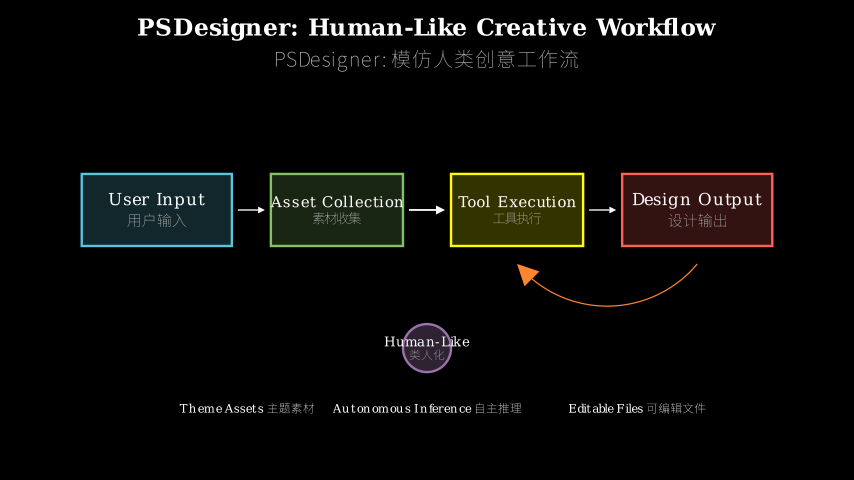
PSDesigner has three main components working in sequence. First, an asset collector retrieves theme-relevant images, fonts, and graphics based on user instructions — think of it as the research phase where a designer gathers materials. Second, a planner (built on an MLLM) interprets the user’s intent and decides what operations to perform: add this image as a layer, apply this filter, adjust that text property. Third, an executor translates these high-level decisions into actual Photoshop API calls that manipulate a PSD file.
The key innovation is training on CreativePSD, a dataset where each design file is paired with the sequence of operations that created it. Instead of learning “what good design looks like” from pixels, the model learns “what good designers do” from action traces. The MLLM sees examples like: “User wants a vintage poster → Designer adds sepia filter → Designer overlays texture → Designer adjusts layer opacity to 70%.” This operation-level supervision teaches the system to think in tools, not pixels.
Data flows like this: user instruction → asset collector fetches materials → planner generates operation sequence → executor applies operations to PSD → output is an editable, layered design file.
User Intent
    |
    v
[Asset Collector] ---> (images, fonts, graphics)
    |                           |
    v                           v
[MLLM Planner] <--- CreativePSD training data
    |                  (operation traces)
    v
(operation sequence: add_layer, apply_filter, adjust_opacity...)
    |
    v
[Executor] ---> Photoshop API calls
    |
    v
Editable PSD File
(layers, vectors, adjustable properties)
Think of PSDesigner as a cooking assistant that learned by watching chefs, not by looking at finished dishes. A regular image generator is like showing the assistant photos of meals and asking it to recreate them — it might produce something that looks right, but you can’t adjust the seasoning or swap ingredients. PSDesigner instead learned the recipe: “sauté onions first, add garlic after 2 minutes, deglaze with wine.” When you ask for a design, it doesn’t paint a picture; it follows a procedure. The asset collector is the pantry run, the planner is reading the recipe and deciding what to do next, and the executor is the hands doing the actual cooking. The output isn’t a photo of food — it’s a dish you can still modify, with each ingredient on its own layer.
Key Concepts
-
Operation Trace Supervision: Instead of training on input-output pairs (text → image), the model learns from input-process-output triples (text → operation sequence → image). Imagine teaching someone to play chess by showing them not just winning positions, but the move-by-move game records of grandmasters. The model doesn’t just learn what good design looks like; it learns the decision tree of how to get there. In practice, this means the training data includes annotations like “Step 1: create new layer, Step 2: insert asset_042.png, Step 3: apply gaussian blur radius=5” — the actual Photoshop operations a designer performed.
-
Tool-Use Capability: The system doesn’t generate pixels; it calls functions. Think of it like the difference between drawing a circle by hand versus calling
circle(x, y, radius)in code. PSDesigner has a vocabulary of design operations (add layer, adjust hue, apply mask, etc.) and learns when to invoke each one. This is why the output is editable — it’s not a rendered image but a structured file where each element is a separate, modifiable object. The MLLM acts as a controller that issues commands to a design API, much like how you’d use a programming language to manipulate a document. -
CreativePSD Dataset: This is the secret sauce. Existing design datasets are just collections of finished images. CreativePSD contains PSD files (Photoshop’s native format with full layer information) plus the operation history that created them. It’s like having not just a codebase, but the Git commit history showing how it was built. The dataset covers diverse scenarios (posters, social media graphics, ads) and styles (minimalist, vintage, corporate), giving the model a broad vocabulary of design procedures to learn from.
Framework Shift
Before (mainstream approach):        After (this paper):

Text prompt                          Text prompt
     |                                    |
     v                                    v
[Text-to-Image Model]              [Asset Collector]
     |                                    |
     v                                    v
Pixel image                          Material library
(flat, uneditable)                       |
                                         v
                                   [MLLM Planner]
                                    (trained on
                                   operation traces)
                                         |
                                         v
                                   Operation sequence
                                         |
                                         v
                                    [Executor]
                                         |
                                         v
                                   Layered PSD file
                                   (editable, structured)
From generating outputs to executing procedures, the core shift is treating design as a sequence of tool operations rather than a pixel prediction problem.
Expert Assessment
Problem choice: This is a real gap. Professional designers don’t work with flat images; they need editable files. The problem sits at the intersection of creative AI and practical tooling — a space that’s been underserved because it requires both generative modeling and software engineering chops.
Method maturity: The approach is clever but not revolutionary. Using operation traces for supervision is smart, and the modular architecture (collector + planner + executor) is clean. However, the reliance on an MLLM for planning feels like it could be a bottleneck — MLLMs are expensive to run and can be unpredictable. I’d want to see ablations on whether a smaller, specialized model could handle the planning step.
Experimental integrity: The baselines seem fair (comparing against template-based methods and direct generation approaches), but I’m skeptical about the evaluation metrics. “Design quality” is subjective, and user studies with 20 participants aren’t enough to draw strong conclusions. The paper would benefit from more rigorous quantitative metrics — maybe measuring how often the generated operations match expert designers’ choices on held-out tasks.
Writing quality: The paper front-loads motivation well, but the technical sections get dense. The description of CreativePSD’s construction is buried in supplementary material when it should be front and center — that dataset is the main contribution. The results section also conflates “our system works” with “our approach is necessary” — more ablations would clarify which components actually matter.
Verdict: weak accept — Solid execution on a practical problem, but the evaluation could be more rigorous and the technical novelty is incremental rather than groundbreaking.
Takeaways
The big idea you can steal: train on process, not just outcomes. If you’re building any system that needs to produce structured, editable outputs (code, CAD files, music scores), consider collecting datasets with operation traces rather than just final artifacts. The shift from “learn to generate X” to “learn to construct X” unlocks editability and interpretability.
Concretely, the three-component architecture (retrieval + planning + execution) is a clean pattern for tool-use systems. You can apply this to other creative domains: a music composition system that retrieves samples, plans arrangement operations, and executes DAW commands; a 3D modeling system that fetches assets, plans transformations, and executes Blender API calls.
The CreativePSD dataset construction method is also transferable. If you’re in a domain where experts use software tools, you can instrument those tools to log operation histories and build a dataset of “how experts work” rather than just “what experts produce.” This is more labor-intensive than scraping finished outputs, but it teaches models to think in the domain’s native operations.
论文: 2603.25738 作者: Xincheng Shuai, Song Tang, Yutong Huang, Henghui Ding, Dacheng Tao 分类: cs.CV
缺口
现有的AI设计工具走捷径。
文生图模型如DALL-E或Midjourney生成像素输出——好看,但无法在Photoshop等专业工具中编辑。
多模态大模型可以建议布局或配色,但它们不产出设计师实际使用的分层、矢量化文件。
缺口在于:没有系统能通过镜像专业人士实际设计流程的方式,将用户意图桥接到可投入生产的可编辑设计文件。
此前的方法要么(1)生成没有图层结构的光栅图像,要么(2)使用缺乏创意灵活性的模板填充。
两者都没有捕捉到设计师收集素材、组合图层、调整属性、精修元素的迭代式、工具驱动的过程。
问题:用户意图 → ??? → 可编辑设计文件
     (现有:像素或僵化模板)
          |
          v
假设:专业工作流 = 素材收集 + 工具操作
          |
          v
方法:在带操作轨迹的PSD文件上训练
      构建素材检索 + 工具执行系统
          |
          v
证据:CreativePSD数据集(标注操作的PSD)
      在设计质量指标上超越基线
          |
          v
结论:工作流模仿 > 直接生成
增量
一句话: 这篇论文之前,AI生成设计图像;之后,AI像人类设计师一样在可编辑文件上执行设计操作。
核心机制
PSDesigner有三个依次工作的主要组件。
首先,素材收集器根据用户指令检索主题相关的图像、字体和图形——可以理解为设计师收集材料的调研阶段。
其次,规划器(基于多模态大模型构建)解读用户意图并决定执行什么操作:把这张图加为图层、应用这个滤镜、调整那段文字的属性。
第三,执行器将这些高层决策翻译成实际操纵PSD文件的Photoshop API调用。
关键创新在于在CreativePSD上训练,这是一个数据集,其中每个设计文件都配对了创建它的操作序列。
模型不是从像素学习”好设计长什么样”,而是从动作轨迹学习”好设计师做什么”。
多模态大模型看到的例子是:“用户想要复古海报 → 设计师添加棕褐色滤镜 → 设计师叠加纹理 → 设计师将图层不透明度调至70%。“这种操作级监督教会系统用工具思考,而非用像素思考。
数据流动如下:用户指令 → 素材收集器获取材料 → 规划器生成操作序列 → 执行器将操作应用到PSD → 输出是可编辑的分层设计文件。
用户意图
    |
    v
[素材收集器] ---> (图像、字体、图形)
    |                      |
    v                      v
[多模态大模型规划器] <--- CreativePSD训练数据
    |                     (操作轨迹)
    v
(操作序列: 添加图层、应用滤镜、调整不透明度...)
    |
    v
[执行器] ---> Photoshop API调用
    |
    v
可编辑PSD文件
(图层、矢量、可调属性)
把PSDesigner想象成一个通过观察厨师学习的烹饪助手,而不是通过看成品菜学习。
常规图像生成器就像给助手看菜品照片然后让它复现——它可能做出看起来对的东西,但你无法调整调味或替换食材。
PSDesigner学的是菜谱:“先炒洋葱,2分钟后加蒜,用酒收汁。“当你要求一个设计时,它不是画一幅画;它遵循一个程序。
素材收集器是去储藏室拿材料,规划器是读菜谱并决定下一步做什么,执行器是实际动手做菜的手。
输出不是食物的照片——而是你仍然可以修改的菜,每种食材都在自己的图层上。
关键概念
- 操作轨迹监督: 模型不是在输入-输出对(文本→图像)上训练,而是从输入-过程-输出三元组(文本→操作序列→图像)学习。
想象教人下棋不只展示获胜局面,而是展示大师的逐步棋谱。
模型不只学习好设计长什么样;它学习如何到达那里的决策树。
实践中,这意味着训练数据包含类似”步骤1: 创建新图层,步骤2: 插入asset_042.png,步骤3: 应用高斯模糊半径=5”的标注——设计师执行的实际Photoshop操作。
- 工具使用能力: 系统不生成像素;它调用函数。
想想手绘圆和在代码中调用circle(x, y, radius)的区别。
PSDesigner有一套设计操作词汇表(添加图层、调整色相、应用蒙版等),并学习何时调用每一个。
这就是为什么输出可编辑——它不是渲染的图像,而是结构化文件,其中每个元素都是独立的、可修改的对象。
多模态大模型充当控制器,向设计API发出命令,就像你用编程语言操纵文档一样。
- CreativePSD数据集: 这是秘密武器。
现有设计数据集只是成品图像的集合。
CreativePSD包含PSD文件(Photoshop的原生格式,带完整图层信息)加上创建它们的操作历史。
就像不只有代码库,还有显示它如何构建的Git提交历史。
数据集覆盖多样场景(海报、社交媒体图形、广告)和风格(极简、复古、企业),给模型提供了广泛的设计程序词汇来学习。
框架转变
之前(主流方法):                  之后(本文方法):

文本提示                         文本提示
     |                               |
     v                               v
[文生图模型]                    [素材收集器]
     |                               |
     v                               v
像素图像                         材料库
(扁平、不可编辑)                     |
                                    v
                              [多模态大模型规划器]
                               (在操作轨迹上
                                  训练)
                                    |
                                    v
                              操作序列
                                    |
                                    v
                               [执行器]
                                    |
                                    v
                              分层PSD文件
                              (可编辑、结构化)
从生成输出到执行程序,核心转变是将设计视为工具操作序列而非像素预测问题。
专家评审
选题眼光: 这是真缺口。
专业设计师不用扁平图像工作;他们需要可编辑文件。
问题位于创意AI和实用工具的交叉点——这个空间一直服务不足,因为它既需要生成建模又需要软件工程能力。
方法成熟度: 方法巧妙但不革命性。
用操作轨迹做监督很聪明,模块化架构(收集器+规划器+执行器)很清晰。
但依赖多模态大模型做规划感觉可能是瓶颈——多模态大模型运行昂贵且可能不可预测。
我想看消融实验,看更小的专用模型能否处理规划步骤。
实验诚意: 基线看起来公平(与基于模板的方法和直接生成方法比较),但我对评估指标持怀疑态度。
“设计质量”是主观的,20名参与者的用户研究不足以得出强结论。
论文会受益于更严格的定量指标——也许测量生成的操作在保留任务上与专家设计师选择的匹配频率。
写作功力: 论文前面的动机铺垫得好,但技术部分变得密集。
CreativePSD构建的描述埋在补充材料里,而它应该放在最前面——那个数据集是主要贡献。
结果部分也混淆了”我们的系统有效”和”我们的方法必要”——更多消融实验能澄清哪些组件真正重要。
判决: 弱接收——在实际问题上执行扎实,但评估可以更严格,技术新颖性是渐进式而非突破性的。
要点总结
你能偷走的大想法:在过程上训练,而不只是结果。
如果你在构建任何需要产出结构化、可编辑输出的系统(代码、CAD文件、乐谱),考虑收集带操作轨迹的数据集而不只是最终产物。
从”学习生成X”到”学习构造X”的转变解锁了可编辑性和可解释性。
具体来说,三组件架构(检索+规划+执行)是工具使用系统的清晰模式。
你可以将其应用到其他创意领域:音乐创作系统检索样本、规划编排操作、执行DAW命令;3D建模系统获取素材、规划变换、执行Blender API调用。
CreativePSD数据集构建方法也可迁移。
如果你在专家使用软件工具的领域,你可以给这些工具加仪器记录操作历史,构建”专家如何工作”而非只是”专家产出什么”的数据集。
这比抓取成品输出更费力,但它教会模型用领域的原生操作思考。